1. IMAP security authentication
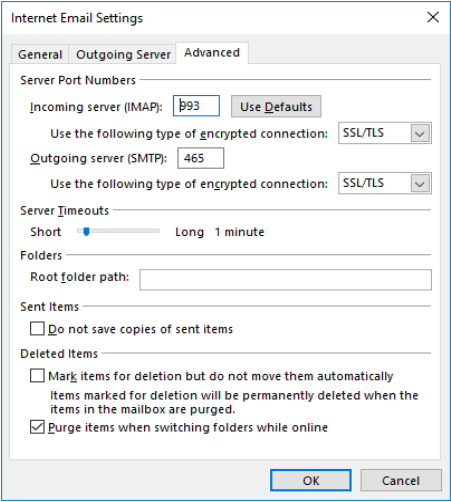
Outlook [Office365] setting default จะมีการตั้งค่าเป็น security มีการ encryption connection เพื่อความปลอดภัยยิ่งขึ้น
Setting POP Security Authentication
| Type | ตั้งค่า 1 | ตั้งค่า 2 |
| Incoming server (POP): | 993 | 993 |
| Use the following type of encrypted connection: | SSL/TLS | SSL/TLS |
| Outgoing server (SMTP): | 465 | 587 |
| Use the following type of encrypted connection: | SSL/TLS | STATTTLS |
Setting POP None-Security Authentication
| Type | ตั้งค่า 1 | ตั้งค่า 2 |
| Incoming server (POP): | 143 | 143 |
| Use the following type of encrypted connection: | uncheck | uncheck |
| Outgoing server (SMTP): | 25 | 8825 |
| Use the following type of encrypted connection: | None | None |
ผลการทดสอบการตั้งค่า
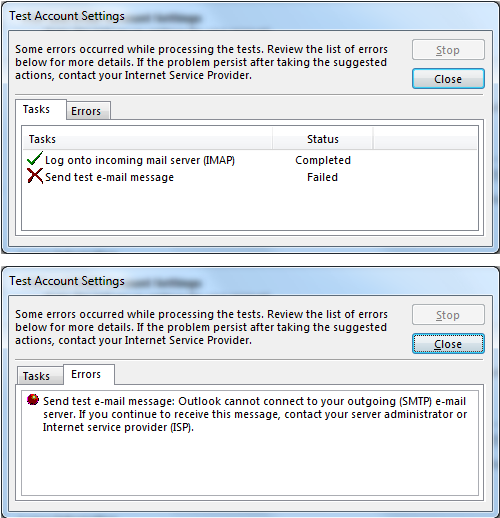
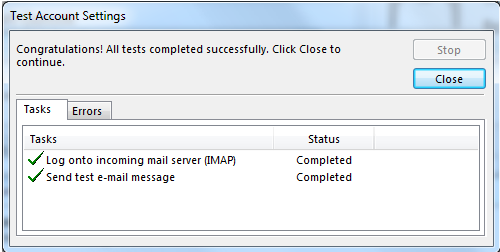
เมื่อมีการตั้งค่า Port การใช้งานในโปรแกรม Outlook เรียบร้อยแล้วจากนั้นกด Next โปรแกรมจะมีการทดสอบการ Connect ไปยัง Server mail ซึ่งผลที่ได้จะต้อง Completed ทั้ง Incoming และ Outgoing(Send)
กรณีที่ Outgoing(Send) แสดงผล Failed หรือไม่ผ่านจะต้องเข้าไปแก้ไข Port Outgoing server (SMTP) ซึ่งผู้ใช้งานจะต้องทดลองเปลี่ยน Port การใช้งาน ได้แก่ 25, 8825 หรือ 587 และตั้ค่า Use the following type … ตามตาราง
สาเหตุ เนื่องด้วยผู้ใช้บริการอินเตอร์เน็ตบางราย บางพื้นที่ จะปิดการใช้งาน Port 25 เนื่องด้วยเป็นช่องทางในการโจมตี Attack DDOS ดังนั้น ผู้ใช้งานเองจะต้องทดสอบเปลี่ยน Port การใช้งาน