


Note: กรณีตั้งค่าใช้งานบนอุปกรณ์เคลื่อนที่โดยมีคอมฯเครื่องหลักอยู่แล้ว แนะนำให้ตั้งค่าการซิงค์ข้อมูลแบบ IMAP
1. Run application Mail for android

2. เลือก Add new account
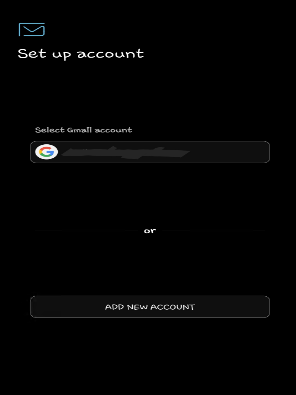
3. พิมพ์ชื่อ Account user@your-domain.com ผู้ใช้งาน และรหัสผ่าน
กรณีจำรหัสผ่านไม่ได้ แนะนำให้ทดสอบ Login ผ่านเว็บเมล์ http://mail.your-domain.com
4. จากนั้นเลือก Manual Setup
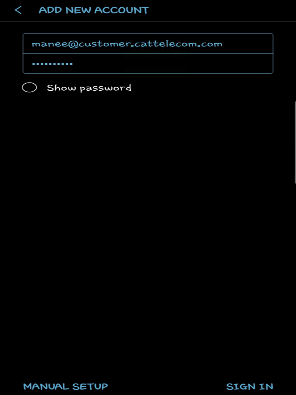
5. เลือก Imap
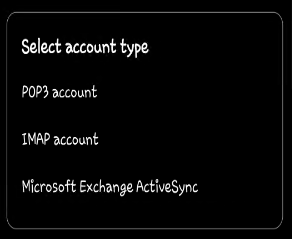
6. Incomming server ตั้งค่าเป็น mail.your-domain.com
7. Security type เลือกเป็น SSL (Accept all certificates)
8. Port 993
9. Outgoing server (SMTP) ตั้งค่าเป็น mail.your-domain.com
10. Security type เลือกเป็น TLS (Accept all certificates)
11. Port 587
12. Authentication required before ใส่ชื่อ Account abc@your-domain.com ผู้ใช้งาน และรหัสผ่าน
13. จากนั้นกด Done
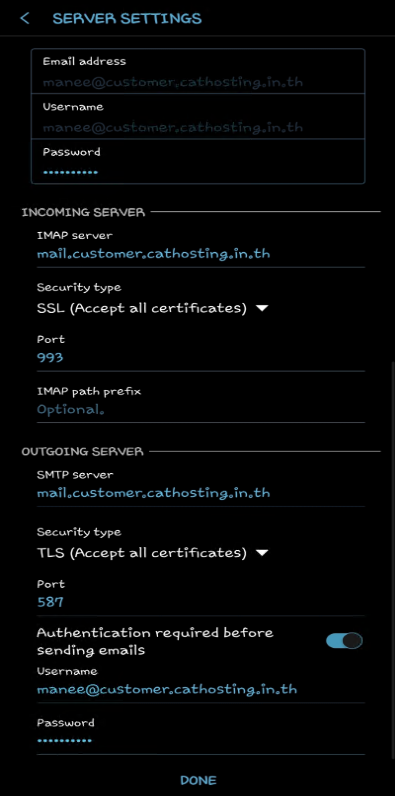
ขั้นตอนการ Add new account เสร็จเรียบร้อยแล้ว กรณีมี Error แจ้งเตือน หรือตั้งค่าไม่ถูกต้อง รบกวนตรวจสอบการตั้งค่าจากข้างต้นอีกครั้ง หรือเปิดเคสสอบถาม support_brk@ntdatacenter.net